
How Do I Get Internet on My Laptop While Traveling: Easy Guide
ARTICLE TITLE: How Do I Get Internet on My Laptop While Traveling: Easy Guide
Are you planning your next adventure but worried about staying connected on the road? Imagine this: you're in a beautiful, remote location, and you need to check an important email or find directions to your next destination.
Suddenly, the panic sets in as you realize you have no internet access on your laptop. It's a situation no traveler wants to face, yet it's all too common. But don't worry—there are solutions that can keep you connected no matter where your travels take you.
In this guide, you'll discover simple and effective ways to get internet on your laptop while traveling. Whether you're a digital nomad, a business traveler, or just someone who loves to explore new places, these tips will ensure you stay online without hassle. Ready to unlock the secrets to seamless connectivity? Keep reading to find out how you can stay connected and enjoy peace of mind on your journey.

Credit: www.getnomad.app
Mobile Hotspot Options
Traveling with a laptop? Use mobile hotspot options to stay connected. Connect your laptop to a smartphone's hotspot for internet access. Portable Wi-Fi devices also provide a reliable connection on the go.
Traveling with your laptop can be exciting, but staying connected is crucial. One reliable way to ensure you have internet access is through mobile hotspot options. Whether you're working remotely from a beachside café or catching up on emails during a layover, having a mobile hotspot can make all the difference. Let's dive into two practical methods to get your laptop online: using your smartphone as a hotspot and portable Wi-Fi devices.
Using Smartphone As A Hotspot
Did you know your smartphone can be a quick internet solution? Most modern phones have a built-in hotspot feature, letting you share your mobile data with your laptop. To use this, simply navigate to your phone’s settings and find the “Hotspot” or “Tethering” section. Turn it on, and your laptop can connect to your phone’s Wi-Fi network. Remember, using your phone as a hotspot can eat up data quickly, so keep an eye on your usage. Also, consider your phone’s battery life; prolonged hotspot use can drain it faster.
Portable Wi-fi Devices
If relying on your phone’s data isn’t ideal, portable Wi-Fi devices might be your savior. These gadgets, often called MiFi, can connect multiple devices to the internet without draining your phone's battery. These devices are small enough to fit in your pocket and are available through various service providers. Choose a plan that suits your travel needs, whether it’s pay-as-you-go or unlimited data. Before purchasing, check if the device supports international roaming, especially if you travel abroad frequently. This way, you won’t be stuck hunting for Wi-Fi in foreign lands. Consider this: how often do you find yourself needing internet access on the go? Ensuring you're prepared with a reliable hotspot can save you from countless headaches.
Public Wi-fi Access
Traveling with a laptop often requires internet access for tasks like checking emails. Public Wi-Fi hotspots offer a convenient solution at airports, cafes, and hotels. Always ensure secure connections by using a VPN to protect personal data.
Traveling with your laptop opens up countless opportunities to stay connected, work remotely, or simply browse the web. One of the most accessible ways to get online is through public Wi-Fi access. Whether you're in a bustling city or a remote village, public Wi-Fi can be your digital lifeline. However, finding these hotspots and using them safely requires a bit of know-how.
Finding Public Wi-fi Locations
Public Wi-Fi is widely available in places like cafes, libraries, airports, and hotels. Before you set out on your journey, consider downloading an app like WiFi Map or WiFi Finder. These apps can help you locate nearby hotspots and provide details on whether they require a password. Once, during a trip to Paris, I discovered a cozy café with free Wi-Fi simply by asking a local. Don’t hesitate to ask people around you; they often know the best spots. Also, check for Wi-Fi options at major transportation hubs like train stations and airports.
Safety Tips For Public Networks
Using public Wi-Fi can be risky if you're not careful. Always ensure your connection is secure by looking for the padlock icon in your browser’s address bar. This indicates a secure connection to the website you are visiting. Consider using a Virtual Private Network (VPN) for an added layer of security. A VPN encrypts your data, making it harder for hackers to steal your information. During a trip to a crowded airport, I realized the importance of a VPN when I noticed a suspicious connection attempt on my laptop. Be cautious with the information you share online. Avoid logging into sensitive accounts or making financial transactions on public networks. Have you ever thought about what might happen if your bank details were compromised while traveling? It’s a risk you can avoid with just a few precautions. By following these practical tips, you can enjoy the convenience of public Wi-Fi while keeping your data secure. Next time you're on the move, you'll be equipped to find and use public networks safely and effectively.
Sim Cards And Data Plans
Traveling with a laptop requires a reliable internet connection. SIM cards and data plans offer convenient solutions. They provide internet access without relying on Wi-Fi hotspots. Understanding these options can enhance your travel experience. Let's explore the world of SIM cards and data plans.
Local Vs. International Sim Cards
Local SIM cards can save money. They offer affordable rates within a country. Buying one is easy at airports or shops. International SIM cards cover multiple countries. They are perfect for frequent travelers. These cards reduce the hassle of changing SIMs. Choose based on your travel destination.
Prepaid Data Plans
Prepaid data plans offer flexibility. They allow you to control your spending. You pay for the data you need upfront. No surprise bills at the end of the month. Many providers offer these plans. Check for coverage and pricing. Ensure the plan suits your travel needs.
Tethering Solutions
Traveling with a laptop means staying connected is essential. Tethering solutions offer a way to use your phone's internet for your laptop. It's a convenient method for accessing the web on the go. These solutions are easy and practical for travelers. Explore the options below to see which suits your needs best.
Usb Tethering
USB tethering connects your phone to a laptop with a cable. It's a fast and reliable method. Simply connect your phone to your laptop using a USB cable. Enable USB tethering in your phone's settings. This setup provides a stable internet connection. It also charges your phone while connected. Perfect for long browsing sessions.
Bluetooth Tethering
Bluetooth tethering uses wireless technology. No cables needed. First, pair your phone with your laptop via Bluetooth. Enable Bluetooth tethering in your phone's settings. This method consumes less battery than a hotspot. Suitable for short sessions and basic browsing. Ideal for quick internet access on the move.
Satellite Internet Services
Traveling with a laptop? Satellite internet services offer a reliable option. They connect through satellites, ensuring internet access in remote areas. Stay online anywhere with ease.
Traveling with a laptop can be an adventure, but staying connected is often a challenge. Satellite Internet Services provide a unique solution for travelers who find themselves in remote areas without traditional Wi-Fi or mobile data access. Imagine being in the middle of a desert or high up in the mountains, yet still able to check emails or stream videos. Satellite Internet makes this possible, bridging the gap between your laptop and the vast world of information online.
When To Use Satellite Internet
Satellite Internet is the go-to option when you’re off the beaten path. If your travel plans include places where cellular networks are spotty, satellite Internet becomes invaluable. Think of camping trips in national parks or expeditions in rural areas. It’s ideal when you need reliable access without relying on local infrastructure. Have you ever found yourself in a beautiful, secluded spot, only to realize you can't share the moment because there's no Internet? Satellite Internet solves this problem, ensuring you're connected anywhere on Earth.
Cost And Availability
Understanding the cost of satellite Internet is crucial. It's generally more expensive than traditional options. But, for the peace of mind and connectivity it offers, many travelers find it worth the investment. Providers offer various plans, so it’s important to compare costs and features. Availability is another factor; not all regions have coverage from every provider. Research beforehand to ensure the service meets your needs for the area you’ll be visiting. Have you considered how much you value constant connectivity? This might guide you in deciding if satellite Internet is the right choice for your travels. Satellite Internet Services offer a unique solution for travelers seeking connectivity in remote locations. By understanding when to use it and considering the cost and availability, you can make informed decisions that enhance your travel experiences.
Renting Pocket Wi-fi
Traveling with a laptop? Renting pocket Wi-Fi provides seamless internet access. Stay connected anytime, anywhere, without relying on unpredictable hotel networks.
Renting pocket Wi-Fi can be a great option for travelers. It provides a portable internet solution. Stay connected without relying on public networks. This device offers a personal hotspot. Multiple gadgets can connect simultaneously. This is perfect for those on the go. Pocket Wi-Fi rentals are available in many countries, offering convenience and flexibility.
How To Rent
Renting pocket Wi-Fi is straightforward. Start by searching online for rental services. Check if they serve your destination. Compare prices and data plans. Choose a service that fits your needs. Book in advance to ensure availability. Once booked, pick up the device at the airport or hotel. Return it at the end of your trip.
Pros And Cons
Pocket Wi-Fi offers several benefits. It's portable and easy to use. Share the connection with multiple devices. Avoid data roaming charges. Stay secure with a private network. There are some drawbacks. Rental costs can add up. Battery life may be limited. You need to return the device. Coverage might vary in remote areas. Consider these factors before renting. Make sure it suits your travel style.
Vpn Usage For Security
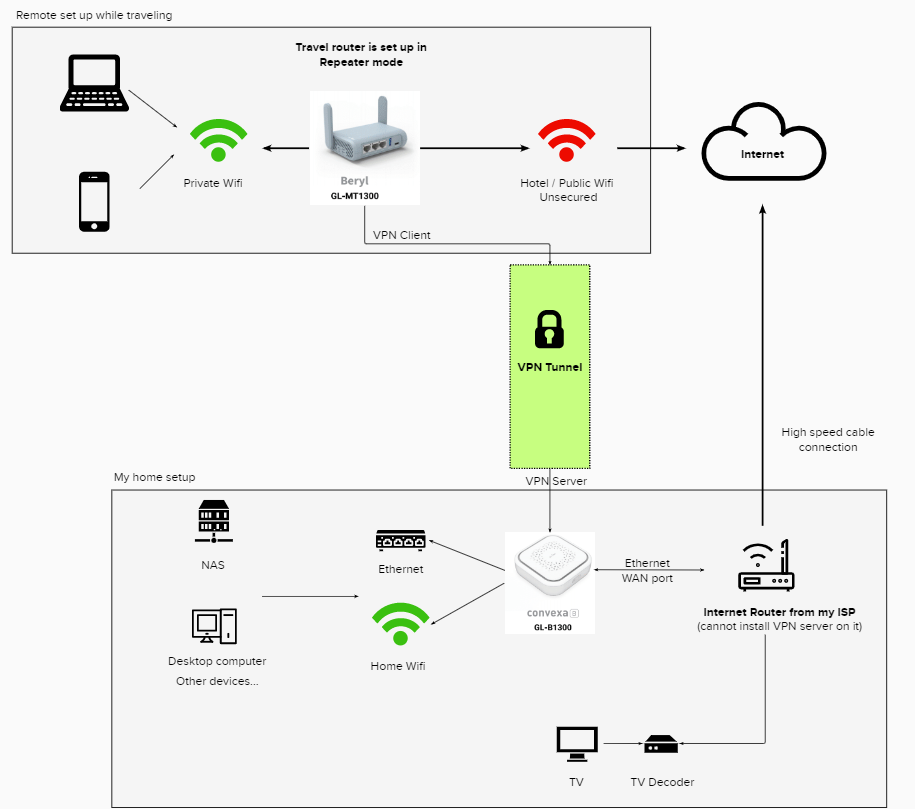
Traveling with a laptop often requires secure internet access. Using a VPN enhances privacy by encrypting data. This shields your information from hackers, especially on public Wi-Fi networks.
Traveling with your laptop offers a unique freedom but also brings security concerns, especially when connecting to unknown Wi-Fi networks. Whether you’re sipping coffee in a bustling Parisian café or catching up on emails in a quiet Tokyo hotel, protecting your data is crucial. That's where a VPN, or Virtual Private Network, comes into play. A VPN secures your internet connection, ensuring your data remains private and untouched by prying eyes. Let's explore how you can effectively use a VPN for security while traveling.
Choosing A Reliable Vpn
Selecting the right VPN can feel overwhelming with numerous options available. Prioritize VPNs known for their strong encryption standards and no-logs policy. Security and privacy should be non-negotiable. Consider ease of use as well. A user-friendly interface can save you from a lot of headaches, especially if you’re new to VPNs. Traveling often means juggling multiple devices. Ensure your chosen VPN supports simultaneous connections, so your laptop and smartphone can stay protected.
Benefits Of Vpns
A VPN does more than just safeguard your data. It also allows you to access geo-restricted content, giving you the freedom to enjoy your favorite shows or websites anywhere in the world. Additionally, VPNs help in bypassing local internet censorship. If you're in a country with strict internet regulations, a VPN can be your gateway to unrestricted browsing. Perhaps you've heard tales of identity theft or data breaches. With a VPN, you add an extra layer of security against such threats, giving you peace of mind as you explore the world. Incorporating a VPN into your travel routine is not just a tech-savvy choice; it's a smart one. Have you ever considered how vulnerable your data might be on public Wi-Fi? A VPN ensures that vulnerability is minimized, keeping your information secure. As you plan your next adventure, think about the digital safety nets you have in place. Is a reliable VPN part of your travel toolkit? If not, it might be time to reconsider.

Credit: www.goabroad.com

Credit: www.airalo.com
Frequently Asked Questions
How Do I Get Internet Access On My Laptop Away From Home?
Use a mobile hotspot from your phone or get a portable Wi-Fi device for internet access. Connect to public Wi-Fi at cafes or libraries. Consider using a USB modem or tethering options. Ensure your laptop's Wi-Fi is enabled and check data plans for cost-effective solutions.
How Do I Connect My Laptop To The Internet While Traveling?
Connect to Wi-Fi at cafes, airports, or hotels. Use a mobile hotspot from your smartphone. Consider portable Wi-Fi devices for reliable access. Check local SIM cards for data plans. Always secure your connection with a VPN for safety.
How Can I Get Internet On My Laptop Without Wi-fi?
Use a USB modem or mobile hotspot to connect your laptop to the internet without Wi-Fi. Alternatively, connect via Ethernet cable or tethering through a smartphone using USB or Bluetooth. Ensure your data plan supports tethering for seamless connectivity.
What Is The Safest Way To Access The Internet When Traveling?
Use a VPN to encrypt your connection and avoid public Wi-Fi networks. Regularly update your devices and software. Enable two-factor authentication for added security. Connect to trusted networks and disable auto-connect features. Regularly monitor your accounts for suspicious activities.
Conclusion
Traveling with a laptop can be fun and easy. Finding internet on the road is simple. Use mobile hotspots or prepaid SIM cards. Public Wi-Fi is another option. Just stay safe by using a VPN. Portable Wi-Fi devices work well for group travel.
Always check local internet options before leaving. Planning ahead saves time and stress. Keep your laptop charged for uninterrupted access. Follow these tips to stay connected. Enjoy your travel adventures online. Stay informed and entertained wherever you go. Happy traveling and browsing!