Traveling with a laptop can sometimes feel like a balancing act. You want to stay connected and productive, but you also want to keep your device safe and your travel experience smooth.
Imagine being able to effortlessly weave your laptop into your travel plans without the stress or hassle. Whether you’re a digital nomad, a business traveler, or just someone who likes having their tech handy, knowing how to travel with a laptop can make all the difference.
We’ll explore practical tips and strategies that ensure your laptop is protected, accessible, and ready to use whenever you need it. Curious about how to make your laptop your perfect travel companion? Keep reading to discover the secrets to a seamless travel experience with your tech by your side.
Choosing The Right Laptop Bag
Traveling with a laptop requires the right bag. A good laptop bag protects your device. It also keeps your belongings organized. Picking the right one ensures comfort and security. Consider different features and materials. This helps in making the best choice.
Features To Look For
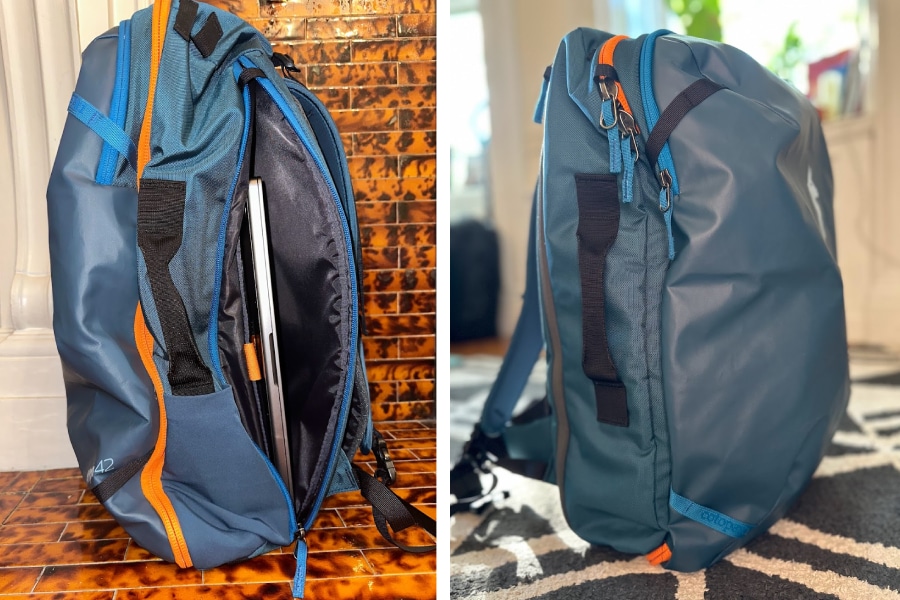
Your laptop bag should have enough space. It must fit your laptop snugly. Check for padded compartments. These protect from bumps and falls. Multiple pockets help organize accessories. Look for adjustable straps for comfort. A lightweight design reduces travel strain. Ensure the bag has secure zippers. This prevents theft and keeps items safe.
Best Materials For Durability
Choose a laptop bag made from strong materials. Nylon is lightweight and water-resistant. It’s perfect for all weather. Polyester is another good option. It is durable and affordable. Leather bags offer a classic look. They last long and age well. Canvas bags are tough and eco-friendly. They are ideal for rugged travels. Ensure the material suits your travel needs.

Credit: www.asus.com
Packing Essentials
Traveling with a laptop requires smart packing. Protect your device with a padded case to prevent damage. Keep chargers and accessories organized to ensure easy access during security checks.
Packing your laptop for travel requires more than just tossing it into your bag. You need to ensure it’s safe from bumps and scratches while keeping all necessary accessories within easy reach. It’s not just about convenience; it’s about peace of mind knowing your tech is ready to go when you are. A few years ago, I learned the importance of packing essentials the hard way—when my laptop ended up with a cracked screen after a bumpy ride. Since then, I’ve always paid extra attention to packing. Here’s how you can do the same.
Protective Gear
Your laptop’s first line of defense is its case. A sturdy, shock-absorbing case can save your device from unexpected drops or bumps. Hard-shell cases or padded sleeves are excellent choices. They offer a snug fit and protection. Consider a screen protector, especially if you’re traveling in crowded places. It guards against scratches and smudges. Plus, it’s a lifesaver if you tend to drop things often. Using a waterproof backpack or bag can also be a game changer. It not only safeguards your laptop from water damage but also provides additional space for other items.
Necessary Accessories
Packing the right accessories can transform your travel experience. Keep your charger at the top of your list. Without it, your laptop is just a fancy paperweight. Choose a compact, travel-friendly charger that won’t take up much space. Bring along a portable mouse. While touchpads are convenient, a mouse offers precision, making work or leisure activities smoother. If you’re tight on space, a foldable or compact mouse is a good option. Don’t forget a universal adapter if you’re traveling abroad. Different countries have different power outlets, and being prepared can save you from unnecessary hassles. Traveling with a laptop can be seamless if you pack wisely. What other essentials do you consider crucial when packing your laptop for travel? Your insights might just be the missing piece someone needs.
Security Measures
Safeguarding your laptop during travels involves using a padded case to prevent physical damage. Secure your device with passwords and encryption to protect sensitive data. Avoid leaving your laptop unattended in public places for added security.
Traveling with a laptop requires careful consideration, especially when it comes to security. Your laptop holds not just hardware but also personal and professional data that could be vulnerable during transit. Whether you’re a digital nomad or just someone who likes to stay connected on the go, understanding how to protect your device and data is crucial.
Using Anti-theft Bags
Choosing the right bag can make a significant difference. Anti-theft bags come equipped with features like lockable zippers, cut-resistant materials, and hidden pockets. These can deter potential thieves and keep your laptop safe. I once traveled through crowded train stations in Europe with a regular backpack. I learned the hard way how easily someone can unzip a pocket without you noticing. Consider bags that have RFID-blocking compartments to protect your credit cards and passport. This adds an extra layer of security, especially in tourist-heavy areas. Remember, a thief’s worst enemy is time. The more obstacles you put in their way, the less likely they are to target you.
Software And Data Security
Your physical laptop isn’t the only thing that needs protection. Ensuring your software and data are secure is equally important. Always use strong, unique passwords and enable two-factor authentication for all your accounts. This adds an additional step for anyone trying to access your information. Keep your operating system and antivirus software updated. Updates often include patches for security vulnerabilities. Imagine losing your laptop only to realize that your personal data is compromised. Regular updates significantly reduce this risk. Consider encrypting your data. Many operating systems offer built-in encryption tools that can protect your files even if your laptop falls into the wrong hands. Ask yourself: If your laptop were lost or stolen today, would your data be safe? Taking these security measures can significantly reduce risks and give you peace of mind while traveling. Remember, it’s always better to be safe than sorry. Your laptop is more than a piece of tech; it’s a gateway to your personal and professional world. Protect it diligently.
Credit: thesavvybackpacker.com
Airport And Travel Tips
Traveling with a laptop requires careful planning. Airports and flights demand extra attention. You’ll need to ensure your device’s safety and functionality. Here are some essential tips for a smooth journey with your laptop.
Navigating Security Checks
Security checks can be stressful. Keep your laptop accessible. Place it in a separate bin during screening. Avoid stacking items on it. This speeds up the process.
Use a laptop-friendly bag. Many bags have a dedicated laptop compartment. This makes it easier for security checks.
Double-check your laptop after the scan. Ensure you have all your belongings. Mistakes happen during busy times.
Handling Long Flights
Long flights can drain your laptop’s battery. Charge it fully before your flight. Carry a portable charger as a backup. Some flights offer charging ports. Check with your airline beforehand.
Use your laptop wisely during the flight. Dim the screen to save energy. Close unnecessary applications running in the background.
Store your laptop safely when not in use. Use a padded sleeve or case. This prevents damage during turbulence.
Dealing With Different Climates
Traveling with a laptop requires adapting to various climates. Protect it in humid areas with waterproof sleeves. In cold places, keep it warm in padded bags. Use a cooling pad in hot weather to prevent overheating. Always check the local climate and prepare accordingly for safe travels with your device.
Traveling with a laptop can be quite the adventure, especially when you’re navigating through different climates. Whether you’re heading to a humid rainforest or a snow-covered mountain, understanding how to protect your laptop is crucial. It’s not just about keeping your device functional; it’s about ensuring that your tech companion remains your reliable source of information and entertainment. Ever wondered how moisture or extreme temperatures could affect your laptop? Let’s dive into some practical tips to keep your laptop safe and sound, no matter where your travels take you.
Protecting Against Moisture
Moisture can be a silent killer for your laptop. Picture yourself in a bustling city during the rainy season. Even a few drops can seep into your laptop and cause damage. To safeguard your device, consider using a waterproof laptop sleeve. A sturdy sleeve can act as a shield, keeping rain and humidity at bay. You might also want to invest in a small pack of silica gel. These handy packets absorb moisture and can be tucked away in your laptop bag. Think of it as a small insurance policy against accidental spills or unexpected downpours. Have you ever tried sealing your laptop in a zip-lock bag during heavy rains? It might seem quirky, but sometimes the simplest solutions are the most effective.
Managing Extreme Temperatures
Extreme temperatures can be just as challenging. If you’re heading to a tropical paradise or a snowy retreat, your laptop needs a little extra care. Heat can cause your laptop to overheat, leading to performance issues. Keep your laptop out of direct sunlight and ensure it’s stored in a cool, shaded area. Conversely, cold temperatures can affect battery life and cause the screen to become sluggish. A padded laptop case can provide insulation against the cold. During my trip to Iceland, I found that keeping my laptop close to my body helped maintain its temperature. Ever considered the impact of leaving your laptop in a parked car on a hot day? It’s a risk worth avoiding. These small adjustments can make a big difference in keeping your laptop running smoothly across diverse climates. What steps will you take on your next journey to protect your tech?
Power Management
Traveling with a laptop requires smart power management to keep it charged. Use a power bank for extra battery life. Turn off unused applications to save energy.
Managing power efficiently is crucial while traveling with a laptop. Unexpected power outages can disrupt your work and entertainment plans. Proper power management ensures your laptop remains functional throughout your journey. Let’s explore some practical tips to keep your laptop charged and ready.
Portable Chargers And Adapters
Carrying a portable charger can save your day. Choose one compatible with your laptop’s power needs. It should have enough capacity to provide at least one full charge. Check the wattage and voltage requirements before purchase. Travel adapters are also essential. They ensure your charger fits into local sockets. Research the plug types used in your destination. Pack a universal adapter for multiple trips. This prevents unnecessary hassles in foreign countries.
Maximizing Battery Life
Adjusting your laptop’s settings can extend battery life. Lower the screen brightness to conserve power. Turn off Wi-Fi and Bluetooth if not in use. Close unnecessary applications running in the background. Use battery saver modes to limit resource usage. These settings prioritize essential functions. Keep your laptop’s software updated for improved efficiency. Regular updates fix bugs and enhance performance. Following these strategies ensures your laptop stays powered. Enjoy uninterrupted usage during your travels.
Public Wi-fi Safety
Traveling with a laptop often means relying on public Wi-Fi. It’s convenient. But it can be risky. Public Wi-Fi networks are often unsecured. This makes them a target for hackers. Protecting your laptop is important. Understanding public Wi-Fi safety can save you from data theft.
Using Vpns
A Virtual Private Network (VPN) is a must-have tool. It encrypts your internet connection. This keeps your data safe from prying eyes. When using public Wi-Fi, a VPN provides a secure tunnel. It hides your IP address. This makes it difficult for hackers to track you. Choose a reliable VPN service. Ensure it has strong encryption features.
Avoiding Phishing Scams
Phishing scams are common on public Wi-Fi. Hackers create fake websites. They look like real ones. Always check website URLs. Look for spelling errors. These can be signs of phishing attempts. Never click on suspicious links. Be cautious with emails asking for personal information. Verify the source before responding. Use antivirus software to detect threats.

Credit: thesavvybackpacker.com
Insurance And Backup Plans
Traveling with a laptop requires smart planning. Pack it securely to avoid damage and consider insurance for peace of mind. Backup important files to prevent data loss during unexpected situations.
Traveling with a laptop can be a nerve-wracking experience, especially when you think about the potential risks to both the device and the valuable data stored within. Whether you’re heading off on a business trip or a vacation, ensuring that your laptop and its contents are secure is crucial. This is where insurance and backup plans come into play. These strategies not only protect your investment but also ensure you’re not left stranded without your essential files. Let’s dive into how you can safeguard your laptop and data effectively.
Travel Insurance Options
Having travel insurance that covers electronics can be a lifesaver. Imagine being on a trip and accidentally dropping your laptop or having it stolen. With the right insurance plan, you can breathe easier knowing you won’t have to bear the entire cost of replacing your device. When choosing a travel insurance policy, look for plans that specifically include electronics coverage. Some insurers offer add-ons for gadgets, which can be a smart choice if you travel with expensive gear. Read the policy details carefully. Make sure to understand what is covered and under what circumstances. Does the insurance cover accidental damage? What about theft or loss? Clarifying these questions can save you from unexpected surprises later.
Data Backup Strategies
Imagine losing all your important files because your laptop was stolen or damaged. That’s a nightmare you don’t want to face. Implementing a robust data backup strategy ensures your files are safe no matter what happens to your physical device. Start by using cloud storage services like Google Drive, Dropbox, or OneDrive. These platforms automatically sync your files, allowing access from any device. Plus, they’re secure, giving you peace of mind about data safety. Consider keeping a physical backup on an external hard drive or USB stick. Before traveling, back up your essential files and keep this drive in a separate, secure location. This way, even if your laptop is compromised, you still have access to your data. Regularly update your backups. It’s easy to forget, but set reminders to back up your data before each trip. This habit can be a lifesaver in case of unexpected events. Think about it: is your laptop and data really protected while you travel? With the right insurance and backup strategies, you can ensure that your digital life remains intact even when you’re far from home.
Frequently Asked Questions
What Is The Best Way To Travel With A Laptop?
Use a padded laptop bag for protection during travel. Keep it in your carry-on for safety. Avoid exposure to extreme temperatures. Secure with a password and backup important data. Charge it before departure and carry a universal adapter. Ensure it’s easily accessible for airport security checks.
Where Do I Put My Laptop When Travelling?
Place your laptop in a padded, secure laptop compartment within your carry-on bag. Ensure easy access for airport security checks. Keep it away from edges to avoid damage. Use a laptop sleeve for added protection. Always carry it with you to prevent theft or mishandling.
How Do I Take My Laptop Through Tsa?
Place your laptop in a separate bin for X-ray screening at TSA checkpoints. Ensure it’s easily accessible. Follow instructions from TSA officers regarding security procedures. Keep personal items organized for efficiency. Remember, some airports might have specific rules, so check local guidelines beforehand.
What Are The Rules For Taking A Laptop On A Plane?
Carry your laptop in a separate bag or sleeve. Place it in a bin during security checks. Ensure your laptop is charged, as security may ask you to turn it on. Keep it with you in the cabin, not in checked luggage.
Follow airline-specific guidelines for electronic devices.
Conclusion
Traveling with a laptop doesn’t have to be hard. Pack it safely. Use a sturdy case. Protect it from dust and water. Keep it charged. Use a power bank for long trips. Don’t forget your charger. Connect to Wi-Fi securely.
Avoid public networks. Use a VPN for extra safety. Keep your data backed up. Use cloud storage or an external drive. Enjoy your trip. Stay connected with your work or loved ones. Remember these simple tips. Travel smarter with your laptop.
Feel confident and ready for your adventure. Safe travels!