Your laptop is more than just a gadget; it’s your gateway to the world, especially when you’re on the move. Whether you’re heading out on a business trip, a weekend getaway, or a long-term adventure, setting up your laptop for travel can make all the difference.
Imagine breezing through security checks, connecting to Wi-Fi without a hitch, and knowing your precious data is safe and sound. Sounds perfect, right? You’re not alone if you’ve ever felt overwhelmed trying to get your laptop travel-ready. But don’t worry, you’re in the right place.
This guide will walk you through every step to ensure your laptop is ready for any journey, helping you stay productive, entertained, and connected. Let’s make traveling with your laptop a seamless experience!
Choosing The Right Laptop
Setting up your laptop for travel involves ensuring it is lightweight and has reliable battery life. Organize essential apps, protect data with backups, and install security software. Adjust settings for offline use and optimize storage space for efficiency on the go.
Choosing the right laptop for traveling can make or break your trip. Imagine hauling a heavy device up a mountain or struggling to find an outlet at a café in Paris. It’s essential to select a laptop that suits your travel needs. Whether you’re a digital nomad or a vacationer wanting to stay connected, finding a laptop that ticks all the boxes is crucial. Let’s dive into what you should consider.
Lightweight Options
When you’re traveling, every ounce counts. A lightweight laptop can be a game-changer. Think about your backpack or carry-on. Wouldn’t it be nice if your laptop didn’t add unnecessary weight? Brands like Apple and Dell offer ultrabooks designed for easy portability. Consider the MacBook Air or Dell XPS 13. These models are known for their sleek design and feather-like weight. Have you ever tried fitting a bulky laptop into a crowded bus seat? A lightweight option will save you from that hassle.
Durability And Build Quality
Traveling can be tough on your gear. From accidental drops to jostling in overhead compartments, your laptop needs to withstand the journey. Look for models with sturdy build quality. Aluminum bodies or carbon fiber can offer excellent durability. Remember that time you spilled coffee on your laptop? A robust build can help minimize damage. You don’t want to worry about your laptop breaking down halfway through your adventure.
Battery Life Considerations
Imagine being on a long flight with hours of entertainment planned, only to have your laptop die mid-movie. Battery life is crucial when you’re on the go. Some laptops boast a battery life of over 12 hours. The Lenovo ThinkPad series is famed for its impressive battery endurance. Have you ever found yourself scrambling for an outlet in an airport? A long-lasting battery ensures that you stay powered up without constantly searching for a socket. Choosing the right laptop for your travels involves balancing weight, durability, and battery life. What do you value most in a travel laptop?
Essential Software Installations
Setting up your laptop for travel involves installing essential software for seamless connectivity and productivity. Prioritize software for internet browsing, document editing, and secure data storage. Reliable antivirus protection ensures your laptop remains safe during your journeys.
Setting up your laptop for travel is more than just packing a charger and making sure it fits in your bag. The digital world you carry can make or break your travel experience. Essential software installations are crucial to ensure productivity, security, and convenience while you’re away from home. Without these, you might find yourself scrambling for solutions in unfamiliar places. So, what software should you prioritize before embarking on your journey?
Productivity Tools
Traveling often means working on the go. Having the right productivity tools can keep you efficient and organized. Consider installing a cloud-based document editor like Google Docs or Microsoft Office 365. This allows you to access and edit files from anywhere, without the need for constant internet connectivity. A task management app, such as Todoist or Trello, can help you keep track of your itinerary and work tasks. Imagine arriving at your destination and seamlessly transitioning from a sightseeing adventure to a work meeting, all thanks to well-organized digital notes.
Security And Antivirus
Security should never be an afterthought, especially when you’re traveling. Your laptop is vulnerable to threats in unfamiliar networks. Install a reliable antivirus program like Norton or McAfee to protect your device from malware. These programs often come with firewalls that block unauthorized access. Consider using a VPN service, such as ExpressVPN or NordVPN. A VPN encrypts your internet connection, safeguarding your data when using public Wi-Fi networks. Have you ever sat at a bustling café, sipping coffee, and wondered who’s lurking on the network? With a VPN, you can browse with peace of mind.
Travel-friendly Applications
Travel-friendly applications can turn your laptop into a travel companion. Download mapping software like Google Maps for offline use. When you’re lost in a maze of streets, having maps ready can be a lifesaver. Language translation apps, such as Google Translate, can help you navigate conversations in foreign languages. Have you ever tried ordering food and realized you speak zero French? A quick translation can make the difference between ordering snails and enjoying a delicious croissant. Flight tracking apps like FlightAware can keep you updated on your travel schedules. Knowing your flight status in real-time can save you from last-minute airport rushes. Setting up your laptop for travel means more than just downloading apps; it involves creating a digital toolkit that empowers you throughout your journey. What software will transform your travel experience from ordinary to extraordinary?
Data Backup And Cloud Storage
Traveling with a laptop offers convenience but demands preparation. Data backup is crucial to prevent losing valuable information. Cloud storage ensures access to files from anywhere. These tools safeguard data during unpredictable journeys.
External Hard Drives
External hard drives provide a reliable backup solution. They store large amounts of data and are easy to use. Plug in, drag and drop files for quick transfers. Choose a durable model to withstand travel bumps. Look for ones with encryption for added security.
Cloud Storage Solutions
Cloud storage offers flexibility and accessibility. Services like Google Drive, Dropbox, and OneDrive are popular choices. They allow file access from any device with internet. Upload files before traveling to ensure availability. Free plans exist, but consider upgrading for more space.
Automated Backup Systems
Automated backup systems simplify data protection. Software like Acronis or Carbonite runs backups automatically. Set schedules to back up daily or weekly. This ensures data is safe without manual intervention. Save time and avoid the risk of forgetting.

Credit: codysee.com
Optimizing Laptop Performance
Traveling with your laptop can be both exciting and stressful. Ensuring it performs optimally while you’re on the go is crucial. A well-optimized laptop means faster boot times, smoother operations, and less hassle. Imagine working from a cozy cafe in Paris or a bustling street in Tokyo without any tech hiccups. Let’s dive into how you can optimize your laptop performance before hitting the road.
Updating Operating Systems
Start by ensuring your operating system is up to date. An updated OS can improve speed and fix security vulnerabilities. This not only boosts performance but also protects your data while traveling.
Check for updates regularly. Set your laptop to update automatically if possible. This way, you won’t miss crucial updates that enhance performance.
Unnecessary Software Removal
Remove software you rarely use. These programs can slow down your laptop, consuming valuable resources. Think of them as excess baggage weighing you down.
Use tools like the built-in uninstall feature on Windows or Mac. It helps identify apps you haven’t used in months. Consider if you really need them on your journey.
Performance Tweaks
Adjusting performance settings can make a noticeable difference. Lowering visual effects and optimizing battery usage are quick wins. A few tweaks can transform your laptop into a more efficient travel companion.
Consider customizing your power settings. Choose a balanced mode for better efficiency. Have you ever thought about disabling startup programs? They can slow your boot time significantly.
Optimizing your laptop isn’t just about tech; it’s about creating a seamless travel experience. What steps will you take to ensure your laptop performs at its best while exploring the world?
Securing Your Laptop
Preparing your laptop for travel involves essential security steps. Install reliable antivirus software to protect sensitive data. Encrypt files and use strong passwords for added safety during your journey.
Securing your laptop while traveling is essential. You want to protect your data and keep your device safe. Many threats lurk in public places. Preparing your laptop in advance can prevent potential risks. Focus on three key areas: password protection, data encryption, and physical security measures.
Password Protection
Strong passwords are your first line of defense. Create complex passwords using a mix of letters, numbers, and symbols. Avoid using easily guessed information like birthdays or names. Change your passwords regularly to keep them secure. Use a password manager to store and manage them safely.
Data Encryption
Encryption transforms your data into unreadable code. This keeps your information safe from hackers. Most laptops offer built-in encryption tools. Enable these features before your trip. Encrypt sensitive files for added protection. This ensures only authorized users can access your data.
Physical Security Measures
Physical security is just as important as digital security. Always keep your laptop in sight. Use a sturdy laptop bag to protect against bumps and drops. Consider a laptop lock to secure it in hotels or cafes. These locks deter thieves and add extra security. When not in use, store your laptop in a safe place.
Connectivity On The Go
Traveling with a laptop opens a world of possibilities. Staying connected while on the move is crucial. Whether you’re working remotely or keeping in touch with family, reliable connectivity is key. Setting up your laptop for seamless internet access ensures you’re never offline. Let’s explore how to stay connected with your laptop on the go.
Mobile Hotspots
Mobile hotspots provide internet access anywhere with cell coverage. Most smartphones can act as a hotspot. Turn on the hotspot feature in your phone settings. Connect your laptop to the hotspot like a regular Wi-Fi network. Ensure your data plan supports hotspot usage to avoid extra charges. Portable hotspot devices offer another solution. They connect multiple devices and often have better battery life. Consider this option for extensive travel.
Vpn Usage
Public networks can pose security risks. A Virtual Private Network (VPN) encrypts your internet connection. This keeps your data safe from prying eyes. Choose a reliable VPN service with servers worldwide. Install the VPN app on your laptop. Use it whenever connected to public Wi-Fi. VPNs also allow access to region-restricted content. They provide an added layer of privacy. Essential for safe browsing while traveling.
Wi-fi Security
Public Wi-Fi is convenient but risky. Always connect to networks with a password. Avoid sharing sensitive information over public networks. Disable file sharing on your laptop. Keep your system firewall active. Use secure websites with HTTPS protocol. Consider using a browser extension for extra security. Regularly update your operating system and antivirus software. This ensures protection against new threats.
Useful Accessories For Travel
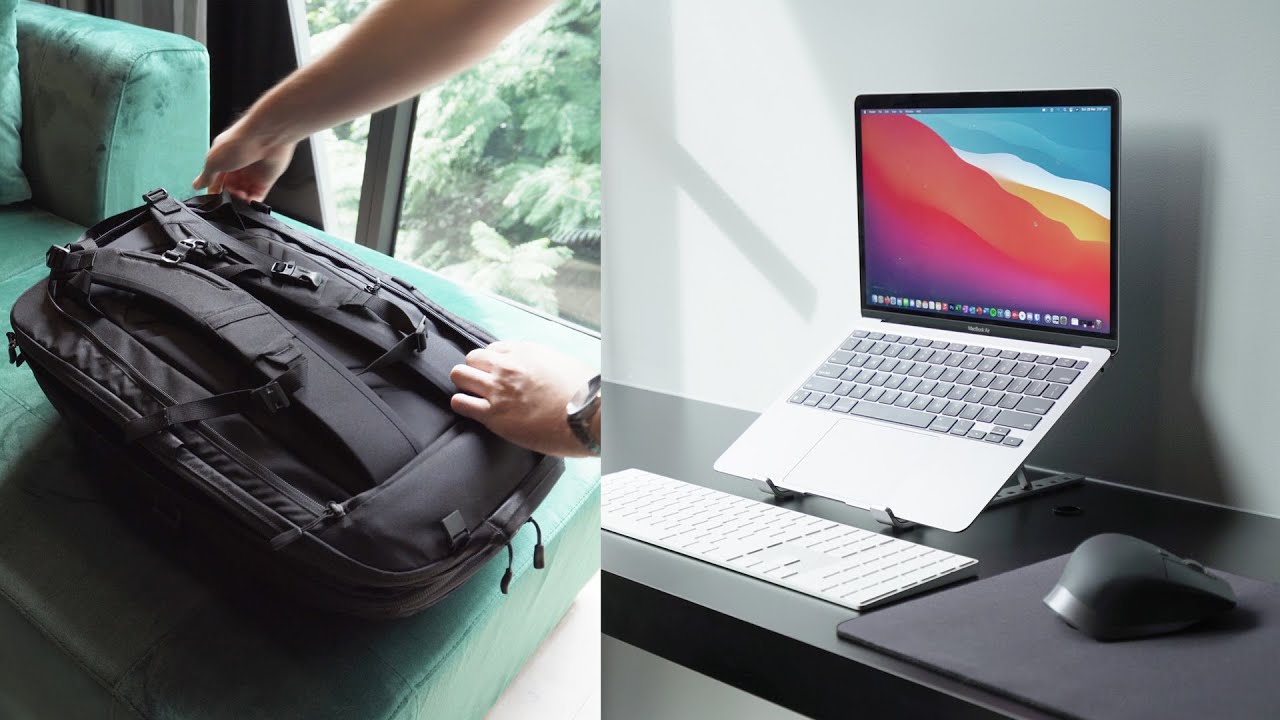
Packing light and smart is key to a hassle-free trip with your laptop. Consider investing in a portable laptop stand for comfort and an external battery pack for uninterrupted power. A compact wireless mouse can enhance productivity, making your travel setup efficient and convenient.
Traveling with a laptop can be challenging without the right gear. Useful accessories make your journey smoother and keep your device safe. They help you stay connected and productive. This section explores essential accessories for traveling with a laptop.
Portable Chargers
A portable charger is vital for travel. It ensures your laptop stays powered throughout the journey. Choose a compact and lightweight model. Ensure it has enough capacity to charge your laptop fully. Some chargers have multiple ports. This allows you to charge several devices at once. Look for fast-charging features for quick power boosts.
Travel Adapters
Travel adapters are necessary for international trips. Different countries have different plug types. A universal travel adapter works in most places. It saves space and reduces the need for multiple adapters. Check if it has USB ports. This feature lets you charge phones and tablets easily. Ensure it supports the voltage of your destination country.
Protective Cases
Protective cases shield your laptop from damage. They prevent scratches and absorb shocks. Choose a case with a snug fit. It should be durable and water-resistant. Padding adds extra protection. Some cases have pockets for accessories. This keeps everything organized and secure. A well-chosen case extends your laptop’s lifespan during travel.
Credit: www.youtube.com
Packing And Organizing
Preparing a laptop for travel involves careful packing and organization. Start by securing your device in a padded case to prevent damage. Ensure all necessary accessories like chargers and adapters are packed, and organize digital files for easy access on the go.
Packing and organizing your laptop for travel can make a world of difference in your journey. Whether you’re heading off on a business trip or a leisurely vacation, having your laptop easily accessible and well-organized can save you time and hassle. It’s not just about fitting everything into your luggage; it’s about ensuring your laptop and its accessories are secure and ready to use. Let’s dive into some practical tips to help you pack efficiently, store your laptop safely, and keep your cables and accessories organized.
Efficient Packing Tips
Packing your laptop efficiently starts with choosing the right bag. Consider using a backpack or a laptop-specific travel bag with padded compartments. This can protect your laptop from bumps and scratches. Think about what you’ll need during your trip. Do you need a mouse, charger, or external hard drive? List these essentials, and pack them first to avoid forgetting them. Create a dedicated section in your bag for your laptop and accessories. This not only helps with organization but also ensures everything is easily accessible. Having a specific spot for your laptop can save you from rummaging through your bag every time you need it.
Safe Storage In Luggage
Storing your laptop safely is crucial. Always place it in the middle of your suitcase to prevent damage from external impacts. Use clothing or a laptop sleeve to cushion your laptop. This acts as an additional barrier against shocks and keeps it stable during transit. Avoid placing heavy items on top of your laptop. This can apply undue pressure and cause damage. Think about your packing order and prioritize your laptop’s safety.
Organizing Cables And Accessories
Cables and accessories can easily become tangled, leading to frustration. Use ziplock bags or small pouches to keep them organized. Label each bag or pouch with the contents. This makes it easier to find what you need without unpacking everything. Consider a travel organizer for your cables and accessories. These compact organizers come with dedicated compartments and can keep everything tidy and prevent tangling. Have you ever found yourself rummaging through your bag looking for a charger right when your laptop’s about to die? Organizing ahead can prevent this stress and keep your travel smooth and efficient.
Troubleshooting Common Issues
Traveling with a laptop can bring unexpected challenges. Troubleshooting common issues is essential for a smooth journey. Whether it’s connectivity problems, battery drain, or software glitches, these issues can disrupt your plans. Knowing how to address them ensures your device remains efficient.
Connectivity Problems
Stable internet is crucial while traveling. First, check the Wi-Fi settings on your laptop. Ensure it is turned on and connected to the right network. If you face issues, restart the router or your laptop. Sometimes, updating the network drivers can fix connectivity problems. Consider carrying a mobile hotspot for reliable internet access.
Battery Drain Solutions
Battery life can be a concern during travel. Dim the screen brightness to save power. Close unnecessary applications running in the background. Enable power-saving mode in your laptop settings. Carry a portable charger or extra battery pack for emergencies. Regularly updating your software can optimize battery performance.
Software Glitches
Software issues might arise unexpectedly. Ensure your laptop has the latest updates. These updates can fix bugs and enhance performance. Restarting your device can resolve minor glitches. In case of persistent issues, consider reinstalling the troublesome application. Always keep a backup of important data to prevent loss.
Credit: www.reddit.com
Frequently Asked Questions
Where Do I Put My Laptop When Travelling?
Place your laptop in a padded, secure compartment within your carry-on bag. Ensure it’s easily accessible for airport security checks. Avoid checking it in luggage to prevent damage or theft. Use a laptop sleeve for extra protection during travel.
How Do I Set Up A New Laptop For The First Time?
Turn on the laptop and follow on-screen instructions. Connect to Wi-Fi and update the operating system. Install antivirus software and essential applications. Customize settings and backup important data. Enjoy your new laptop!
How Do I Get Wifi On My Laptop While Traveling?
Use a portable Wi-Fi hotspot or enable your smartphone’s hotspot feature. Connect your laptop to public Wi-Fi networks in cafes, airports, or hotels. Consider purchasing a travel router for secure connections. Ensure your device’s Wi-Fi is enabled and updated for optimal performance while on the go.
What Is The Best Way To Travel With A Laptop?
Use a padded laptop bag for protection. Keep it in carry-on luggage. Charge the battery beforehand. Backup important data. Avoid exposing it to extreme temperatures.
Conclusion
Traveling with a laptop can be a smooth experience. Preparation is key. Secure your data with backups and passwords. Pack your charger and accessories. Check your laptop’s battery health. Optimize storage for essential files. Keep your device clean and updated.
Protect it with a sturdy case. Use a reliable carry bag for safety. Explore offline options for uninterrupted work. Enjoy your journey with peace of mind. Your laptop is ready for adventure. Follow these tips for hassle-free travel. Make memories, stay connected, and keep your laptop travel-friendly.
Safe travels!