Are you planning a trip and worried about staying connected? Whether you’re a digital nomad, a business traveler, or simply want to share your adventures on social media, having reliable WiFi for your laptop is a must.
Imagine being able to check your emails, stream your favorite shows, or map out your next destination without a hitch. In this guide, we’ll explore practical ways for you to secure internet access on the go, ensuring you never miss out on important updates or entertainment while traveling.
Stay tuned to discover easy and efficient solutions that will keep your laptop connected wherever your journey takes you.

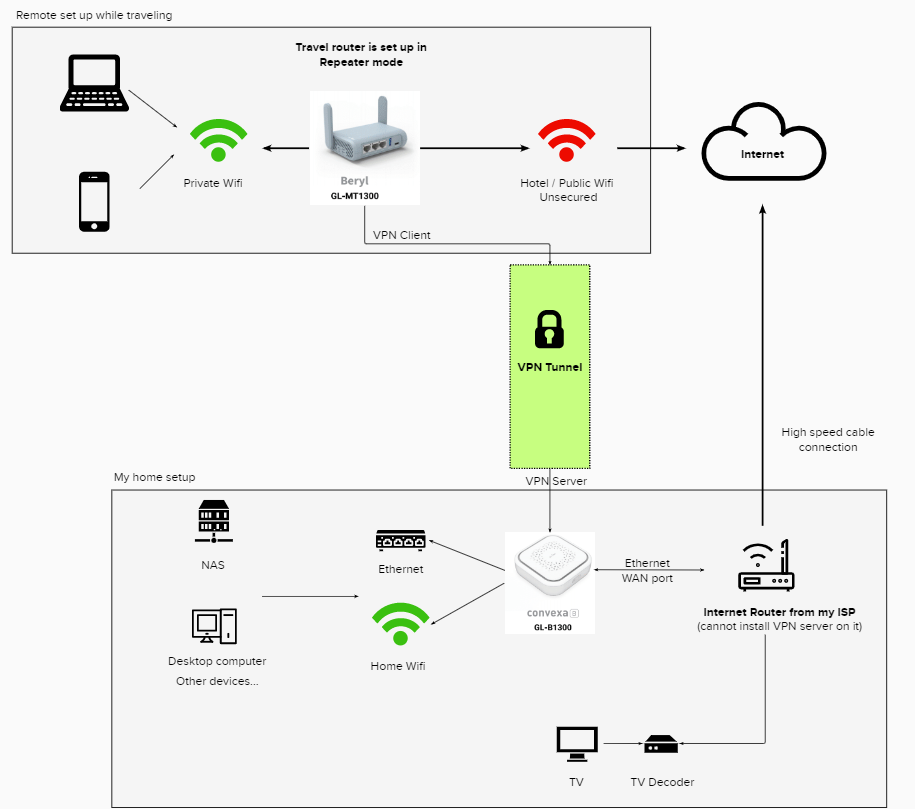
Credit: forum.gl-inet.com
Choosing The Right Mobile Hotspot
Traveling with your laptop can be liberating, but finding reliable internet access on the go is crucial. Whether you’re working remotely or simply staying connected, choosing the right mobile hotspot is essential for seamless connectivity. Let’s dive into some practical ways to ensure your laptop stays connected wherever your adventures take you.
Portable Hotspot Devices
Portable hotspot devices are like little WiFi heroes you can carry in your pocket. These gadgets create a WiFi network using cellular data, giving your laptop internet access almost anywhere. Many travelers swear by them for their convenience and reliability.
These devices come in various shapes and sizes, from tiny dongles to more robust units. Before you buy, consider factors such as battery life and data plan options. Some hotspots offer data sharing with multiple devices, perfect for group travel.
I once traveled across Europe with a hotspot that lasted all day on a single charge. It was a lifesaver during long train rides where the WiFi was spotty at best. Have you thought about how much easier your travel could be with one?
Smartphone Tethering
Smartphone tethering is another handy option for laptop connectivity. Your phone acts as a mobile hotspot, using its data plan to provide internet access to your laptop. It’s ideal for short trips or when you need a quick internet fix.
Setting up tethering is usually straightforward. Most smartphones have this feature in their settings, allowing you to connect with a few taps. However, watch out for data usage—tethering can consume a lot of data quickly.
Once, during a hike, I needed to check an urgent email. Tethering my laptop to my smartphone was quick and efficient. Have you ever found yourself needing internet in the middle of nowhere? It’s amazing how much technology can save the day.
Whether you choose a dedicated hotspot device or rely on your smartphone, planning ahead ensures you stay connected during your travels. What’s your strategy for staying online on the road?
Public Wifi Options
Traveling with your laptop can be exciting and challenging. Staying connected is crucial for work and leisure. Finding reliable internet is essential. Public WiFi options are a convenient solution. They are available in many locations and easy to access. Explore various places that offer free WiFi.
Cafes And Restaurants
Cafes and restaurants often provide free WiFi. Many travelers find comfort in these spots. Enjoy a cup of coffee while checking emails. Search for WiFi signs in these places. Ask staff for the password if needed. This option is great for short online sessions. It allows you to stay connected effortlessly.
Airports And Train Stations
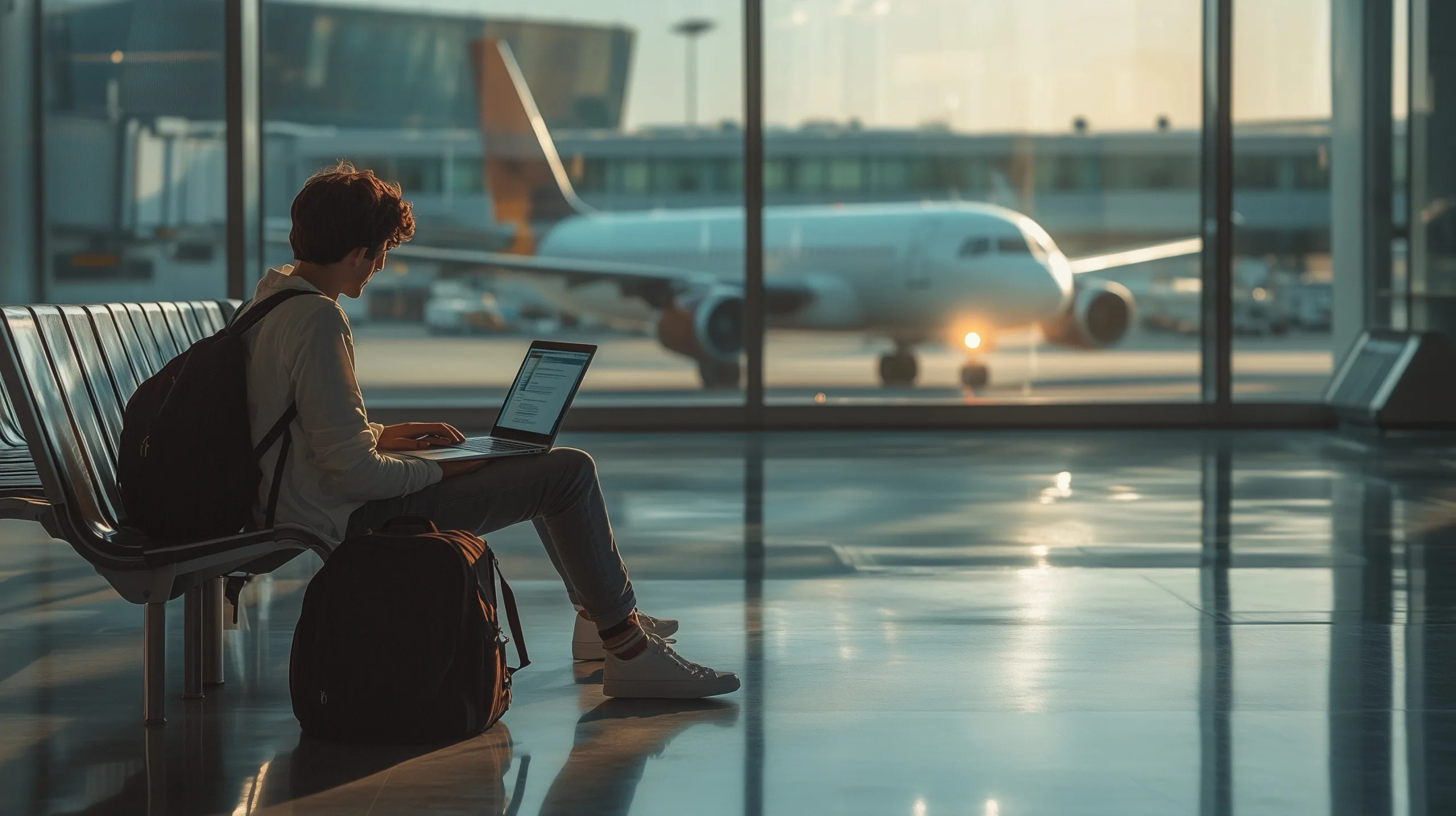
Airports and train stations offer WiFi for travelers. These locations are busy and full of connectivity opportunities. Keep up with travel plans online. Find WiFi zones in terminals and waiting areas. Usually, the connection requires a simple sign-in. This option is perfect for quick updates and communication.
Libraries And Public Spaces
Libraries are quiet and tech-friendly. They offer free internet to visitors. Public spaces like parks sometimes provide WiFi. These locations are ideal for peaceful browsing. Libraries may need a library card for access. Public spaces might have open networks. These options enrich your travel internet experience. They help you stay connected during your journey.
Prepaid Sim Cards
Traveling with your laptop often means needing reliable internet access. One effective solution is using prepaid SIM cards. These cards offer flexible data plans without long-term commitments. They allow internet access wherever you go. Understanding the types of prepaid SIM cards can help you choose the best option for your travel needs.
Local Sim Card Advantages
Purchasing a local SIM card can be cost-effective. It offers cheaper rates compared to roaming. Local cards provide better data speeds. They are widely available at airports and shops. Activation is usually quick and easy. You enjoy local customer support, which is helpful if issues arise.
International Sim Cards
International SIM cards offer convenience for frequent travelers. They work in multiple countries without needing a new card. This saves time and effort during your trips. These cards often come with competitive data rates. You don’t have to worry about changing numbers or settings. Some providers even offer 24/7 customer support.
Travel Routers
Travel routers simplify internet access for laptops during trips. They offer secure and reliable WiFi connections on the go. Compact and easy to use, these devices ensure uninterrupted browsing, whether at a hotel or in transit.
Travel routers are your best companions when it comes to ensuring seamless internet connectivity on the go. These compact devices allow you to create a personal WiFi network using a single internet connection source. Whether you’re trekking through remote mountain villages or lounging in a city café, travel routers can help keep your laptop connected to the world. But how do you choose the right one and set it up efficiently?
Compact Travel Routers
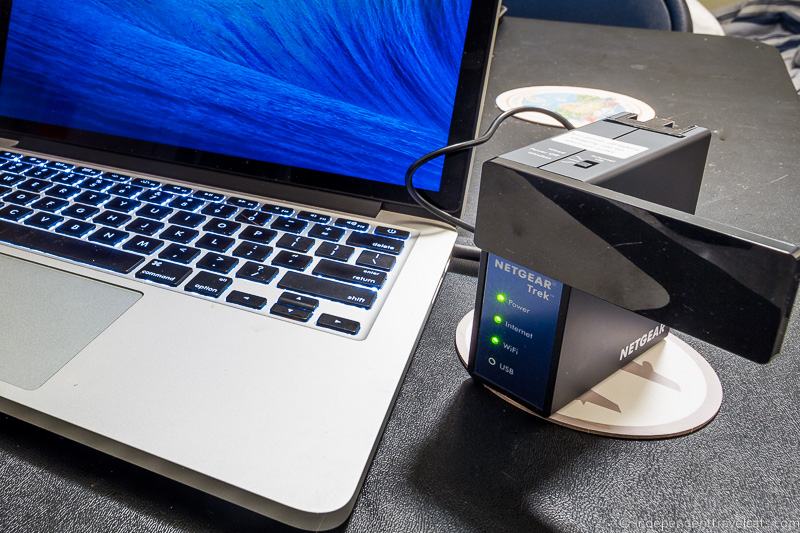
Compact travel routers are designed for portability. They’re small enough to slip into a backpack pocket and light enough not to weigh you down. Brands like TP-Link, Netgear, and GL.iNet offer models that fit the bill perfectly. They come with features such as dual-band connectivity, multiple device support, and even built-in VPNs for added security. Imagine you’re on a train journey across Europe. With a compact travel router, you can enjoy uninterrupted streaming, stay in touch with loved ones, and even catch up on work emails. These routers offer an excellent range, ensuring your laptop stays connected even in tricky spots.
Router Setup Tips
Setting up a travel router is easier than you might think. Start by checking the router’s user manual for specific instructions. Generally, you need to connect the router to an available internet source, often via Ethernet or WiFi. Consider using a secure password to protect your network. This is crucial, especially in public places. Remember to adjust the router settings for optimal performance. You might want to prioritize certain devices over others for better bandwidth distribution. Have you ever struggled with weak hotel WiFi? A travel router can amplify the signal, giving you a reliable connection. Think about the convenience of having your own network in a crowded airport or a secluded cabin. It’s like carrying a piece of home with you, wherever you go. Do you often find yourself juggling multiple devices? Travel routers can help streamline your internet experience. They allow you to connect several gadgets at once, without sacrificing speed. Isn’t it time you made your travels a bit more connected?
Wifi Finder Apps
Traveling often requires reliable internet access. Finding WiFi while on the move can be challenging. WiFi finder apps can help solve this issue. These apps locate nearby WiFi networks, saving time and hassle.
Popular Wifi Finder Apps
Several apps stand out in the market. WiFi Map offers extensive coverage. It includes public and private hotspots. Users can contribute by sharing passwords. Another popular choice is Avast WiFi Finder. It focuses on security and reliability. It also provides detailed network information. Wiman is another user-friendly option. It boasts a large database of free WiFi spots. Each app has unique features. Choose one that fits your needs.
Using Apps Effectively
To maximize these apps, start by downloading your preferred choice. Explore the settings for customization. Allow location access for accurate results. Download offline maps if available. This helps in areas with weak signals. Always verify the network details. Look for user reviews and ratings. Use security features to avoid risks. Regularly update the app for the latest data. This ensures better connectivity and protection.
Credit: ubifi.net
Vpn For Secure Connection
Traveling with a laptop requires a secure internet connection. Using a VPN ensures your data stays private. Finding reliable WiFi for your laptop while traveling becomes hassle-free with a VPN.
Traveling with your laptop can be a fantastic way to stay connected, work remotely, or simply enjoy some downtime online. However, connecting to public Wi-Fi networks can be risky. This is where a VPN (Virtual Private Network) comes in. A VPN encrypts your internet connection, making it secure and private, even on public networks. This means you can access sensitive information without worrying about hackers or data breaches.
Importance Of Vpns
Understanding the importance of VPNs is crucial for any traveler. Public Wi-Fi networks, like those in cafes, airports, and hotels, are often unsecured. This exposes you to potential cyber threats. A VPN provides a secure tunnel for your data, ensuring that your personal information remains private. Moreover, using a VPN allows you to bypass geo-restrictions. This means you can access content that might be blocked in certain countries. Imagine streaming your favorite show while sitting in a Parisian café, without any hiccups. A VPN also helps in maintaining anonymity online. It masks your IP address, making it difficult for websites to track your browsing habits. This is particularly useful if you’re concerned about privacy or want to avoid targeted ads.
Top Vpn Services
Choosing the right VPN service can be a game-changer for your travel experience. Here are some top VPN services that are reliable and user-friendly: 1. ExpressVPN Known for its speed and robust security features. It offers a wide range of server locations and a user-friendly interface. Perfect for streaming and bypassing geo-restrictions. 2. NordVPN Offers an extensive network of servers and strong encryption. It includes features like CyberSec, which blocks ads and malware. A great choice for security-conscious travelers. 3. Surfshark Budget-friendly without compromising on features. It supports unlimited devices, making it perfect if you’re traveling with multiple gadgets. Offers features like CleanWeb for an ad-free experience. 4. CyberGhost Simple to use with dedicated streaming servers. It’s ideal for beginners who want a hassle-free VPN experience. Offers a generous money-back guarantee, so you can try it risk-free. 5. ProtonVPN Known for its strong privacy policies and free version. It’s a great option if you’re looking for a no-cost solution with decent features. When choosing a VPN, consider your specific needs. Do you prioritize speed, security, or cost? Each VPN service offers unique features, so pick the one that aligns with your travel goals. A personal experience: while traveling in Southeast Asia, I found NordVPN invaluable. It allowed me to access my home country’s streaming services without any lag. It also gave me peace of mind while using hotel Wi-Fi to check my bank accounts. Have you ever had a frustrating experience with slow or restricted internet abroad? Trying a VPN might just be the solution you need. With a secure connection in place, you can focus on enjoying your travels without worrying about online safety.
Managing Data Usage
Finding reliable WiFi for your laptop while traveling can ensure seamless internet access. Portable hotspots or pocket WiFi devices are effective options. Consider prepaid data plans to manage costs and stay connected without the hassle of searching for public networks.
Traveling with your laptop and staying connected to the internet can be a balancing act. You want to enjoy seamless connectivity without burning through your data allowance. Managing data usage effectively is crucial, especially when you’re on the go. It’s not just about saving money; it’s also about ensuring you have enough data for essential tasks. Here’s how you can master the art of managing data while traveling.
Data Saving Tips
When you’re traveling, every megabyte counts. Start by adjusting your laptop’s settings to reduce data consumption. Turn off automatic updates. These can quickly eat up your data without you even noticing. Use data compression tools. They help by reducing the size of the data you download and upload. Many browsers have built-in data saving modes that you can easily activate. Be mindful of streaming services. Lower the quality of video streams. This simple step can save a significant amount of data.
Monitoring Data Consumption
Keeping an eye on your data usage is key to staying within limits. Install a data monitoring app on your laptop. These apps provide real-time data usage statistics and alerts. Check your data usage regularly. Most operating systems have built-in data usage meters. These give you a breakdown of which applications are consuming the most data. Consider setting up data usage alerts. These notifications will warn you when you are approaching your data limit. Are there apps that you rarely use but still consume data? It might be time to uninstall or disable them. This will not only save data but also improve your laptop’s performance. By taking these steps, you can keep your data usage in check and enjoy a hassle-free internet experience while traveling. What strategies will you try on your next trip to ensure you stay connected without a hitch?
Credit: independenttravelcats.com
Adapting To Different Regions
Traveling with a laptop requires reliable internet access. Each region offers unique challenges. Understanding these differences ensures seamless connectivity. Knowing local norms and practices helps. Familiarity with regulations is crucial. Language and currency barriers can pose challenges too.
Country-specific Regulations
Countries have different WiFi rules. Some restrict access to foreign devices. Others have unique login procedures. Knowing these rules beforehand is helpful. Some places require registration for access. In certain areas, WiFi is limited to public spaces. Research local regulations before traveling.
Language And Currency Barriers
Language differences affect internet access. Instructions may be in the local language. Using translation apps can help. Currency variations influence WiFi costs. Payment methods might differ. Carrying local currency is often necessary. Understanding common payment systems aids in smooth transactions.
Frequently Asked Questions
How Do I Get Wi-fi On My Laptop While Traveling?
Use a portable Wi-Fi hotspot for internet access. Connect to public Wi-Fi at cafes or airports. Enable your phone’s hotspot feature if possible. Purchase a local SIM card with data for international travel. Use a travel router to share hotel wired internet as Wi-Fi.
How Can I Get Internet On My Laptop Without Being At Home?
Use a mobile hotspot from your smartphone or a portable Wi-Fi device to connect your laptop to the internet while on the go. Public Wi-Fi networks in cafes, libraries, or airports also provide internet access outside home. Ensure security by using a VPN when connecting to public networks.
How Can I Get Internet On My Laptop Without Wi-fi?
Use a USB tethering option from your smartphone. Connect via Ethernet cable for direct internet access. Consider using a mobile hotspot device or a USB modem for cellular data. Install broadband over power lines (BPL) if available in your area.
How Do I Activate Travel Wi-fi?
Turn on the travel Wi-Fi device. Connect your device to the network shown. Enter the provided password. Access the internet. Enjoy your connection!
Conclusion
Traveling with reliable internet on your laptop makes life easier. It helps you stay connected and productive. Choosing the right wifi option is key. Portable hotspots are handy for travelers. Public wifi can be useful, but watch for security risks.
Always check data plans and coverage areas. Keep your devices safe and secure. Simple preparations ensure smooth online access. Stay informed and make smart choices. Enjoy your travels with seamless internet connectivity. Your laptop will be ready when you need it.
Happy surfing and safe travels!